Wednesday, 15 August 2012

WHY TO VISIT TEMPLES ? (Scientific Reason)


There are thousands of temples all over India in different size, shape and locations but not all of them are considered to be built the Vedic way. Generally, a temple should be located at a place where earth's magnetic wave path passes through densely. It can be in the outskirts of a town/village or city, or in middle of the dwelling place, or on a hill
top. The essence of visiting a temple is discussed here.

Now, these temples are located strategically at a place where the positive energy is abundantly available from the magnetic and electric wave distributions of north/south pole thrust. The main idol is placed in the core center of the temple, known as "*Garbhagriha*" or *Moolasthanam*. In fact, the temple structure is built after the idol has been placed. This *Moolasthanam* is where earth’s magnetic waves are found to be maximum. We know that there are some copper plates, inscribed with Vedic scripts, buried beneath the Main Idol. What are they really? No, they are not God’s / priests’ flash cards when they forget the *shlokas*. The copper plate absorbs earth’s magnetic waves and radiates it to the surroundings. Thus a person regularly visiting a temple and walking clockwise around the Main Idol receives the beamed magnetic waves and his body absorbs it. This is a very slow process and a regular visit will let him absorb more of this positive energy. Scientifically, it is the positive energy that we all require to have a healthy life.

Further, the Sanctum is closed on three sides. This increases the effect of all energies. The lamp that is lit radiates heat energy and also provides light inside the sanctum to the priests or *poojaris* performing the pooja. The ringing of the bells and the chanting of prayers takes a worshipper into trance, thus not letting his mind waver. When done in groups, this helps people forget personal problems for a while and relieve their stress. The fragrance from the flowers, the burning of camphor give out the chemical energy further aiding in a different good aura. The effect of all these energies is supplemented by the positive energy from the idol, the copper plates and utensils in the *Moolasthan*am / *Garbagraham*. *Theertham*, the “holy” water used during the pooja to wash the idol is not
plain water cleaning the dust off an idol. It is a concoction of Cardamom,*Karpura* (Benzoin), zaffron / saffron, *Tulsi* (Holy Basil), Clove, etc...Washing the idol is to charge the water with the magnetic radiations thus increasing its medicinal values. Three spoons of this holy water is distributed to devotees. Again, this water is mainly a source of magneto-therapy. Besides, the clove essence protects one from tooth decay, the saffron & *Tulsi* leafs protects one from common cold and cough, cardamom and *Pachha Karpuram* (benzoin), act as mouth fresheners. It is proved that *Theertham* is a very good blood purifier, as it is highly energized. Hence it is given as *prasadam* to the devotees. This way, one can claim to remain healthy by regularly visiting the Temples. This is why our elders used to suggest us to offer prayers at the temple so that you will be cured of many ailments. They were not always superstitious. Yes, in a few cases they did go overboard when due to ignorance they hoped many serious diseases could be cured at temples by deities. When people go to a temple for the *Deepaaraadhana*, and when the doors open up, the positive energy gushes out onto the persons who are there. The water that is sprinkled onto the assemblages passes on the energy to all. This also explains why men are not allowed to wear shirts at a few temples and women are requested to wear more ornaments during temple visits. It is through these jewels (metal) that positive energy is absorbed by the women. Also, it is a practice to leave newly purchased jewels at an idol’s feet and then wear them with the idol’s blessings. This act is now justified after reading this article. This act of “seeking divine blessings” before using any new article, like books or pens or automobiles may have stemmed from this through mere observation.

Energy lost in a day’s work is regained through a temple visit and one is refreshed slightly. The positive energy that is spread out in the entire temple and especially around where the main idol is placed, are simply absorbed by one's body and mind. Did you know, every Vaishnava(Vishnu devotees), “must” visit a Vishnu temple twice every day in their location. Our practices are NOT some hard and fast rules framed by 1 man and his followers or God’s words in somebody’s dreams. All the rituals, all the practices are, in reality, well researched, studied and scientifically backed thesis which form the ways of nature to lead a good healthy life.

The scientific and research part of the practices are well camouflaged as “elder’s instructions” or “granny’s teaching’s” which should be obeyed as a mark of respect so as to once again, avoid stress to the mediocre brains

Monday, 6 August 2012

Get nth Highest Salary from Employee Table


SELECT MAX(Salary) as 'Salary' from EmployeeDetails
where Salary NOT IN (SELECT TOP n-1 (SALARY) from EmployeeDetails ORDER BY Salary Desc)

Delete duplicate rows in a Table

DELETE

FROM MyTable

WHERE ID NOT IN

( SELECT MAX(ID)

  FROM MyTable

  GROUP BY DuplicateColumn1, DuplicateColumn2, DuplicateColumn3

)

Friday, 27 July 2012

Websphere Process Server training docs


Human tasks


 Selectors

Business rules

 BSM
http://publib.boulder.ibm.com/infocenter/ieduasst/v1r1m0/topic/com.ibm.iea.wpi_v6/wpswid/6.0.2/MediationLabs/WPIv602_ESB_UnModeledFaultsLab.pdf

requierment for enhanced for loop in java (J2SE5.0)


Enhanced for loops allow convenient iteration over collections, without the need for an explicitly defined iterator. This reduces the need for boilerplate iteration code and the corresponding opportunities for errors.
as per JSR 121

Wednesday, 25 July 2012

Running Java without Main method

StaticBlockClass.java
~~~~~~~~~~~~~~~~~~~~~

package com.anil.builder.design.pattern;

public  class StaticBlockClass {

      static{
            System.out.println("i dont have main method");
      }
     
}

TestStaticClient.java
~~~~~~~~~~~~~~~~~~~~~

package com.anil.builder.design.pattern;

public class TestStaticClient {

      public static void main(String[] args) throws ClassNotFoundException, InstantiationException, IllegalAccessException {
            Class.forName("com.anil.builder.design.pattern.StaticBlockClass");
      }
}

Tuesday, 24 July 2012

Builder DesignPattern

Builder Design pattern is used when there is a requirement for creating complex objects.
if it is a simple object you can make use of factory design pattern.


Car.java
~~~~~~~~~
package com.anil.builder.design.
pattern;

public class Car {

        private String engine;
        private String tyre;
        private String paint;

        public String getEngine() {
                return engine;
        }

        public void setEngine(String engine) {
                this.engine = engine;
        }

        public String getTyre() {
                return tyre;
        }

        public void setTyre(String tyre) {
                this.tyre = tyre;
        }

        public String getPaint() {
                return paint;
        }

        public void setPaint(String paint) {
                this.paint = paint;
        }

}
----------------------------------------------------

CarBuilder.java
~~~~~~~~~~~~~~~

package com.anil.builder.design.pattern;

public interface CarBuilder {
        public String makeEngine();
        public String makeTyre();
        public String makePaint();
        public void makeCar();
        public Car getCar();
}
----------------------------------------------------------

USCarBuilder.java
~~~~~~~~~~~~~~~~~~

package com.anil.builder.design.pattern;

public class USCarBuilder implements CarBuilder {

        private Car car;

        @Override
        public String makeEngine() {
                // TODO Auto-generated method stub
                return "US Engine added ";
        }

        @Override
        public String makeTyre() {
                return "APPOLO tyres added";
        }

        @Override
        public String makePaint() {
                return "Red colour added";
        }

        @Override
        public void makeCar() {
                car=new Car();
                car.setEngine(makeEngine());
                car.setTyre(makeTyre());
                car.setPaint(makePaint());
        }

        @Override
        public Car getCar() {
                // TODO Auto-generated method stub
                return car;
        }

}
--------------------------------------------------------

GermanCarBuilder.java
~~~~~~~~~~~~~~~~~~~~~~

package com.anil.builder.design.pattern;

public class GermanCarBuilder implements CarBuilder {

private Car car;

        @Override
        public String makeEngine() {
                // TODO Auto-generated method stub
                return "German Engine";
        }

        @Override
        public String makeTyre() {
                return "German tyres";
        }

        @Override
        public String makePaint() {
                return "Blue";
        }

        @Override
        public void makeCar() {
                car=new Car();
                car.setEngine(makeEngine());
                car.setTyre(makeTyre());
                car.setPaint(makePaint());
        }

        @Override
        public Car getCar() {
                return car;
        }

}
----------------------------------------------------

Director.java
~~~~~~~~~~~~~
package com.anil.builder.design.pattern;

public class Director {

        private CarBuilder carBuilder;

        public Director(CarBuilder carBuilder) {
                super();
                this.carBuilder = carBuilder;
        }

        public CarBuilder getCarBuilder() {
                return carBuilder;
        }

        public void setCarBuilder(CarBuilder carBuilder) {
                this.carBuilder = carBuilder;
        }

        public void build() {
                carBuilder.makeCar();
        }
}
-----------------------------------------------------------
Test.java
~~~~~~~~~
package com.anil.builder.design.pattern;

public class Test {

        public static void main(String[] args) {
                CarBuilder builder=new USCarBuilder();
                Director director=new Director(builder);
                director.build();
                Car car=builder.getCar();
                System.out.println(" Car Engine : "+car.getEngine());
        }

 Pattern Definition
 Moves the Construction logic of the Object from the Object Class to Builder Class

Improves
  • Object Construction
  • Making new Changes
  • Modular Design

Thursday, 19 July 2012

Abstract Factory Design Pattern in Java

Definition : Provides an interface for creating families of related or dependent objects without specifying their concrete classes.


Button.java
~~~~~~~~~
package com.anil.product;

public abstract class Button {
        public abstract void add(String os);
}

WinButton.java
~~~~~~~~~~~~
package com.anil.product;

public class WinButton extends Button {

        @Override
        public void add(String os) {
                System.out.println(" Button Added name  "+os+" for Windows");
        }

}

LinuxButton.java
~~~~~~~~~~~~
package com.anil.product;

public class LinuxButton extends Button {
        @Override
        public void add(String os) {
                System.out.println(" Button Added name  "+os+" for Linux");

        }
}

ComboBox.java
~~~~~~~~~~~~
package com.anil.product;

public abstract class ComboBox {
        public abstract void add(String os);
}

WinComboBox.java
~~~~~~~~~~~~~~~~
package com.anil.product;

public class WinComboBox extends ComboBox {

        @Override
        public void add(String os) {
                System.out.println(" Combo Box Added with name  "+os+" for Windows" );
        }

}

LinuxComboBox.java
~~~~~~~~~~~~~~~~
package com.anil.product;

public class LinuxComboBox extends ComboBox {
        @Override
        public void add(String os) {
                System.out.println(" Combo Box Added name  "+os+" for Linux");
        }

}


OSComponents.java
~~~~~~~~~~~~~~~
package com.anil.product;

public abstract class OSComponents {
        public abstract ComboBox createCombo();
        public abstract Button createButton();
}

WindowsComponents.java
~~~~~~~~~~~~~~~~~~~~~
package com.anil.product;

public class WindowsComponents extends OSComponents {

        @Override
        public ComboBox createCombo() {
                return new WinComboBox();
        }

        @Override
        public Button createButton() {
                return new WinButton();
        }

}

LinuxComponents.java
~~~~~~~~~~~~~~~~~~~~
package com.anil.product;

public class LinuxComponents extends OSComponents {

        @Override
        public ComboBox createCombo() {
                return new LinuxComboBox();
        }

        @Override
        public Button createButton() {
                return new LinuxButton();
        }

}


AbstractOSComponentsFactory.java
~~~~~~~~~~~~~~~~~~~~~~~~~~~~~~~~~

package com.anil.product;

public abstract class AbstractOSComponentsFactory {
        public abstract ComboBoxInf createCombo();

        public abstract ButtonInf createButton();

        public static AbstractOSComponentsFactory getOSFactory(String s) {
                if (s == "win") {
                        return new WindowsComponentsFactory();
                } else {
                        return new LinuxComponentsFactory();
                }
        }
}

AbstractFactoryClient.java
~~~~~~~~~~~~~~~~~~~~~~~~~~~~~
package com.anil.product;

public class AbstractFactoryClient {

        public static void main(String os[]) {

                AbstractOSComponentsFactory factory =AbstractOSComponentsFactory.getOSFactory("win");
                factory.createButton().add("windows1");
                factory.createCombo().add("windows2");

        }

}


Benefits

* Isolates concrete classes
* Allows to change product family easily
* Promotes consistency among products
Usage

* When the system needs to be independent of how its products are created composed and represented.
* When the system needs to be configured with one of multiple families of products.
* When a family of products need to be used together and this constraint needs to be enforced.
* When you need to provide a library of products, expose their interfaces not the implementation.

Monday, 16 July 2012

Session Facade

Problem

In a multitiered Java 2 Platform, Enterprise Edition (J2EE) application environment, the following problems arise.
 

if Client is exposed to the Business Objects of the application(DAO,Session Beans or Entity Beans) there will be a tight coupling between the client and the Business Objects.

if the application grows eventually the number of business objects will grow so that Client logic will become more and more complex.

if the Client is Accessing the Enterprise beans directly so There will be a heavy usage of the n/w.


if Multiple Clients are using the Business objects there will not be uniformity in the way client uses them.


To resolve the above issues we can make use of Session Facade Design pattern

Structure :

Session Facade class diagram

Figure 8.15

Participants and Collaborations

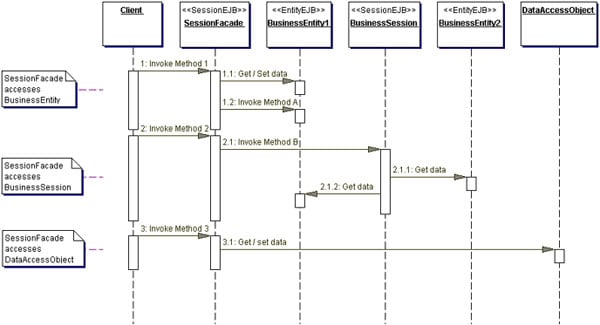
in the below Figure  contains the sequence diagram that shows the interactions of a Session Facade with two entity beans, one session bean, and a DAO, all acting as participants in fulfilling the request from the client.

Session Facade sequence diagram :

Figure 8.16                                          

you can define a Session Facade as

1. Stateless Session bean : if Business process include single method call in your business process
2. Statefull Session bean : if Business process include multiple method calls in your business process


Uses of Session Facade:
  1. Introduces Business-Tier Controller Layer
  2. Exposes Uniform Interface 
  3. Reduces Coupling, Increases Manageability 
  4. Improves Performance, Reduces Fine-Grained Methods 
  5. Provides Coarse-Grained Access 
  6. Centralizes Security Management 
  7. Centralizes Transaction Control 
  8. Exposes Fewer Remote Interfaces to Clients
sample code :


ProjectResourceManagerSession.java


package corepatterns.apps.psa.ejb;

import java.util.*;
import java.rmi.RemoteException;
import javax.ejb.*;
import javax.naming.*;
import corepatterns.apps.psa.core.*;
import corepatterns.util.ServiceLocator;
import corepatterns.util.ServiceLocatorException;

// Note: all try/catch details not shown for brevity.

public class ProjectResourceManagerSession
  implements SessionBean {

  private SessionContext context;

  // Remote references for the
  // entity Beans encapsulated by this facade
  private Resource resourceEntity = null;
  private Project projectEntity = null;
  ...

  // default create
  public void ejbCreate() 
  throws CreateException {
  }

  // create method to create this facade and to
  // establish connections to the required entity
  // beans
  // using primary key values
  public void ejbCreate(
    String resourceId, String projectId, ...)
  throws CreateException, ResourceException {

    try {
      // locate and connect to entity beans
      connectToEntities(resourceId, projectId, ...);
    } catch(...) {
      // Handle exceptions
    }
  }

  // method to connect the session facade to its 
  // entity beans using the primary key values
  private void connectToEntities (
    String resourceId, String projectId)
  throws ResourceException {
    resourceEntity = getResourceEntity(resourceId);
    projectEntity = getProjectEntity(projectId);
    ...
  }

  // method to reconnect the session facade to a
  // different set of entity beans using primary key
  // values
  public resetEntities(String resourceId,
    String projectId, ...)
  throws PSAException {

    connectToEntities(resourceId, projectId, ...);
  }

  // private method to get Home for Resource
  private ResourceHome getResourceHome()
  throws ServiceLocatorException {
    return ServiceLocator.      getInstance().getHome(
        "ResourceEntity", ResourceHome.class);
  }

  // private method to get Home for Project
  private ProjectHome getProjectHome()
  throws ServiceLocatorException {
    return ServiceLocator.      getInstance().getHome(
        "ProjectEntity", ProjectHome.class);  
  }

  // private method to get Resource entity
  private Resource getResourceEntity(
    String resourceId)   throws ResourceException {
    try {
      ResourceHome home = getResourceHome();
      return (Resource) 
        home.findByPrimaryKey(resourceId);
    } catch(...) {
      // Handle exceptions
    }
  }

  // private method to get Project entity
  private Project getProjectEntity(String projectId)
  throws ProjectException {
    // similar to getResourceEntity
    ...
  }

  // Method to encapsulate workflow related
  // to assigning a resource to a project.
  // It deals with Project and Resource Entity beans
  public void assignResourceToProject(int numHours)
  throws PSAException {

    try {
      if ((projectEntity == null) ||
          (resourceEntity == null)) {

        // SessionFacade not connected to entities
        throw new PSAException(...);
      }

      // Get Resource data
      ResourceTO resourceTO =
          resourceEntity.getResourceData();

      // Get Project data
      ProjectTO projectTO =
        projectEntity.getProjectData();
      // first add Resource to Project
      projectEntity.addResource(resourceTO);
      // Create a new Commitment for the Project
      CommitmentTO commitment = new
        CommitmentTO(  ...);

      // add the commitment to the Resource
      projectEntity.addCommitment(commitment);

    } catch(...) {
      // Handle exceptions
    }
  }

  // Similarly implement other business methods to
  // facilitate various use cases/interactions
  public void unassignResourceFromProject()
  throws PSAException {
    ...
  }

  // Methods working with ResourceEntity
  public ResourceTO getResourceData()
  throws ResourceException {
    ...
  }

  // Update Resource Entity Bean
  public void setResourceData(ResourceTO resource) 
  throws ResourceException {
    ...
  }

  // Create new Resource Entity bean
  public ResourceTO createNewResource(ResourceTO 
    resource)   throws ResourceException {
    ...
  }

  // Methods for managing resource's blockout time
  public void addBlockoutTime(Collection blockoutTime) 
  throws RemoteException,BlockoutTimeException {
    ...
  }
  
  public void updateBlockoutTime(
    Collection blockoutTime)   
  throws RemoteException, BlockoutTimeException {
    ...
  }
  
  public Collection getResourceCommitments() 
  throws RemoteException, ResourceException {
    ...
  }

  // Methods working with ProjectEntity
  public ProjectTO getProjectData()
  throws ProjectException {
    ...
  }

  // Update Project Entity Bean
  public void setProjectData(ProjectTO project) 
  throws ProjectException {
    ...
  }

  // Create new Project Entity bean
  public ProjectTO createNewProject(ProjectTO project)
  throws ProjectException {
    ...
  }

  ...

  // Other session facade method examples

  // This proxies a call to a Transfer Object Assembler
  // to obtain a composite Transfer Object.
  // See Transfer Object Assembler pattern
  public ProjectCTO getProjectDetailsData()
  throws PSAException {
    try {
      ProjectTOAHome projectTOAHome = (ProjectTOAHome)
        ServiceLocator.getInstance().getHome(
          "ProjectTOA", ProjectTOAHome.class);
      // Transfer Object Assembler session bean
      ProjectTOA projectTOA = 
          projectTOAHome.create(...);
      return projectTOA.getData(...);
    } catch (...) {
        // Handle / throw exceptions
    }
  }

  // These method proxies a call to a ValueListHandler
  // to get a list of projects. See Value List Handler 
  // pattern.
  public Collection getProjectsList(Date start, 
  Date end) throws PSAException {
    try {
      ProjectListHandlerHome projectVLHHome = 
        (ProjectVLHHome)
          ServiceLocator.getInstance().getHome(
            "ProjectListHandler",
            ProjectVLHHome.class);
      // Value List Handler session bean
      ProjectListHandler projectListHandler = 
        projectVLHHome.create();
      return projectListHandler.getProjects(
                    start, end);
    } catch (...) {
        // Handle / throw exceptions
    }
  }

  ...

  public void ejbActivate() {
    ...
  }

  public void ejbPassivate() {
    context = null;
  }

  public void setSessionContext(SessionContext ctx) {
       this.context = ctx;
  }

  public void ejbRemove() {
    ...
  }
}


Remote Interface :


package corepatterns.apps.psa.ejb;

import java.rmi.RemoteException;
import javax.ejb.*;
import corepatterns.apps.psa.core.*;

// Note: all try/catch details not shown for brevity.

public interface ProjectResourceManager
  extends EJBObject {

  public resetEntities(String resourceId,
  String projectId, ...)
  throws RemoteException, ResourceException ;

  public void assignResourceToProject(int numHours)
  throws RemoteException, ResourceException ;

  public void unassignResourceFromProject()
  throws RemoteException, ResourceException ;

  ...

  public ResourceTO getResourceData()
  throws RemoteException, ResourceException ;

  public void setResourceData(ResourceTO resource) 
  throws RemoteException, ResourceException ;

  public ResourceTO createNewResource(ResourceTO resource)
  throws ResourceException ;

  public void addBlockoutTime(Collection blockoutTime) 
  throws RemoteException,BlockoutTimeException ;
  
  public void updateBlockoutTime(Collection blockoutTime) 
  throws RemoteException,BlockoutTimeException ;
  
  public Collection getResourceCommitments()
  throws RemoteException, ResourceException;

  public ProjectTO getProjectData()
  throws RemoteException, ProjectException ;
  
  public void setProjectData(ProjectTO project) 
  throws RemoteException, ProjectException ;

  public ProjectTO createNewProject(ProjectTO project)
  throws RemoteException, ProjectException ;

  ...

  public ProjectCTO getProjectDetailsData()
  throws RemoteException, PSAException ;

  public Collection getProjectsList(Date start, 
  Date end) throws RemoteException, PSAException ;

  ...
}
 
 
Home Interface :


package corepatterns.apps.psa.ejb;

import javax.ejb.EJBHome;
import java.rmi.RemoteException;
import corepatterns.apps.psa.core.ResourceException;
import javax.ejb.*;

public interface ProjectResourceManagerHome 
extends EJBHome {
    
    public ProjectResourceManager create() 
            throws RemoteException,CreateException;
    public ProjectResourceManager create(String
        resourceId, String projectId, ...) 
            throws RemoteException,CreateException;
}
 
 
Note : the usage of Session Facade is depend on the application.For a smaller 
application Session Facade does add much.it is useful when your application goes bigger


Resource :
 http://www.oracle.com/technetwork/java/sessionfacade-135203.html
http://www.oracle.com/technetwork/java/sessionfacade-141285.html 

Sunday, 15 July 2012

JSP Static include and Dynamic include


Static Include : <%@include file="secondInclude.jsp"%>

used to add or include static content in jsp


Dynamic Include : <jsp:include page="include.jsp"></jsp:include>

used to addup Dynamic content in JSP.

Implecit Objects of jsp

  • request
  • response
  • out
  • session
  • page : (like this references current jsp instance)
  • pageContext : with context info it has access to all implicit variables of the page and used for setting the attributes of different scopes and has methods for including another URL's contents, and for forwarding or redirecting to another URL. 
          Ex :  pageContext.include( test.jsp ); pageContext.forward( test.jsp );
  • application : this Object is Like ServletContext.
  • Exception
  • config : this Object is Like ServletConfig.

Collection Hierarchy in Java


Collection Interface Hierarchy


_____________________________________________________________________________________________

The Core Collection Interfaces and Their Implementations
_____________________________________________________________________________________________

The Core Map Interfaces and Their Implementations